https://developer.mozilla.org/en-US/docs/Web/HTTP/Reference/Headers
HTTP headers let the client and the server pass additional information with a message in a request or response.
a header is a case-insensitive name followed by a colon, then optional whitespace which will be ignored, and finally by its value (for example: Allow: POST
Headers can be grouped according to their contexts:
Contain more information about the resource to be fetched, or about the client requesting the resource.
Hold additional information about the response, like its location or about the server providing it.
Contain information about the body of the resource, like its MIME type, or encoding/compression applied.
Contain representation-independent information about payload data, including content length and the encoding used for transport. و نظرا لوجود الكثير من الheaders و التي تنقسم الى request and response headers سوف اكتفى ببعض الheaders المهمه و البعض المستخدم في هجمات
Request Headers
Origin
- What: Indicates the origin of the request, comprising protocol, host, and port.
- Why: Used by servers to enforce Cross-Origin Resource Sharing (CORS) policies. CORS determines what domains are allowed to talk to the server, it is enforced by browser. By checking
Origin, a server can allow or block cross-origin requests. - How: Browsers automatically include this header on cross-origin AJAX (Asynchronous JavaScript and XML) or fetch requests. Right now JavaScript often uses JSON instead of XML but name stuck
Look for
Access-Control-Allow-Origin: *or matching the malicious origin.
Simply put, if the Origin in our request doesn’t match what the server allows, the browser blocks access to the response. However the server may still respond, but the browser won’t let JS read it. That’s the key CORS point most people miss.
Referer
Important
IMPORTANT: In browsers and this domain overall the name is misspelled so we use Referer not the correct English word “referrer”
-
What: Indicates the URL of the page making the request (not always included if privacy settings or HTTPS→HTTP transition). For example clicking a URL from ChatGPT will make it your referrer.
-
Why: Helps the server understand navigation flow. This is for the website owners to know where they receive their mainly traffic. However, it can unintentionally leak sensitive paths or query parameters (e.g., session tokens in URL).
-
How: Browsers send
Refererautomatically. -
-
Example Leak: We’re logged in into a site and the URL shows like this:
-
That ‘session=ABC123’ is sensitive and should never leave the site! Now let’s say the site has a image or something else from another site like this.
<img src="https://ads.evil.com/banner.png">
Now if we click on that URL the other site will receive this kind of request.
Referer: https://bank.com/account?session=ABC123
Now if site is malicious and it receives our session token and can exploit it, OR if evil.com is not actually evil but has poor security another attacker can hijack our session token.
Authorization
Authorization is needed to prove to the server that you are allowed to enter and do x, its not the same as Authentication which is for proving who you are.
- What: Carries authorization credentials, its point is to prove the server that you are already logged in and that you’re allowed to do whatever you want to do.
Credentials example Basic vs Bearer:
Basic authorization credential will be something like:
Authorization: Basic dXNlcjpwYXNz
Its encoded in Base64 and simply means
username:password
So with Basic:
- Your real password is sent on every request
- Server decodes it every time
- If someone sees it once, they have your password forever
Over HTTP → instant compromise
Over HTTPS → still bad practice, but survivable
Basic is always username + password
Bearer authorization credential will be something like:
Authorization: Bearer eyJhbGciOi...
Now this is not our password or something else, it is our Token. It basically means that we were logged in, and it is our proof that we are allowed to access the service.
The token usually contains or points to:
- Your user ID
- Your permissions
- Expiration time
The server checks:
- Is this token real?
- Did I issue it?
- Is it still valid?
This is safer than Basic credentials because stealing this we steal session not the password. Session will expire sooner or later unless the service was made by an idiot, and when it does attacker will lose access if we didn’t know that we are compromised.
Warning
Important to note that Base64 is NOT for security, its made for binary-to-text encoding and easier data transfer.
- Why: Necessary for API endpoints that require user authentication since API’s don’t have login pages, they trust Tokens. can be stolen if transmitted insecurely, for example: If token - Is sent through HTTP, visible through logs, via referrer headers, through XSS, then anyone who sees it can reuse it. The server can’t tell legit from stolen. Same token, same trust.
- How: Sent automatically by browser or API client, once client got the token the app or browser will auto-attach it, user doesn’t see it.
User-Agent
-
What: Identifies the client application and version, telling the server ‘characteristics’ of the requester, e.g.,
Mozilla/5.0 (Windows NT 10.0; Win64; x64) AppleWebKit/... Chrome/... Safari/.... -
Why: Servers can use User-Agent for content negotiation or device-specific functionality, like desktop vs mobile layout etc.
Cookie
-
What: Cookies are tiny pieces of data the server gives your browser to remember you. They are sent automatically as name=value pairs of stored cookies, like:
Cookie: sessionId=abc123; pref=darkmode;.sessionId=abc123 → identifies your session (who you are logged in as)
pref=darkmode → personalization
-
Why: Cookies do 3 main things.
1. Session management – keeps you logged in.
2. Personalization – stores preferences.
3. Tracking – analytics or advertising.
Security angle:
Cookies are like keys to your account. If they leak, the attacker doesn’t need your password—they can impersonate you instantly.
HttpOnly:
Stops JavaScript from reading the cookie.
Without it, an XSS payload anywhere on the page can grab
document.cookieand steal your session.Think: XSS + no HttpOnly = instant account takeover.
Secure:
Cookie only travels over HTTPS.
Without it, the cookie can be intercepted over HTTP.
Example: public WiFi, sniffing traffic → attacker sees sessionId in plain text → can replay it.
SameSite:
Prevents cookie from being sent in cross-site requests.
Without it, CSRF attacks are easy: Session cookies should expire quickly. Persistent cookies without expiration or rotation make compromise long-lasting. Weak session IDs (predictable or short) → brute-force attacks possible.
-
Testing Example:
- Open DevTools → Application → Cookies.
- Check if the session cookie has
HttpOnlyandSecureattributes. If missing, attempt XSS or, drop to HTTP to intercept cookie (if it lacksSecure).
Warning
Session Fixation Is important to pay attention to: Attacker sets or predicts a session ID before login; if the server doesn’t rotate it after authentication, the attacker can use the same ID to access the victim’s account.
Example: https://site.com/login?sessionId=ATTACKER123 → victim logs in → server keeps sessionId=ATTACKER123 → attacker reuses it to access the account.
Content-Type / Accept
-
What:
Content-Typeindicates the media type of the request bodyExample (JavaScript):
fetch("https://api.example.com/data", {
  method: "POST",
  headers: {
    "Content-Type": "application/json"
  },
  body: JSON.stringify({foo: "bar"})
});
The server reads this header to know it should parse the body as JSON.
Sometimes developers also enforce or check this server-side in code (e.g.,
if request.content_type != 'application/json' → reject).Accept:
This is the client telling the server that it can handle X response type.
Usually set in the HTTP request headers. Developers set it in:
- JavaScript fetch/XHR
- API clients
- Sometimes server frameworks auto-set it depending on route.
Example in fetch():
fetch("https://api.example.com/data", {
  headers: {
    "Accept": "application/json"
  }
});
To see this process as a user:
-
Open DevTools → Network tab in your browser.
-
Make the request (click a link, submit a form, call an API).
-
Click the request → Headers tab.
-
Under Request Headers, you’ll see both:
Content-Type(if it has a body, like POST/PUT)Accept(always sent by browser for GETs too)
Basically:
- Content-Type = “How I’m sending you data”
- Accept = “How I want you to respond”
- Why: Servers rely on
Content-Typeto parse input correctly,Content-Typetells the server how to interpret the request body.
Warning
If server expects application/json but receives application/xml, it may:
- Throw errors → information leak
- Misparse the body → injection opportunity (e.g., XML injection, SQL injection, deserialization)
- Accept it anyway → trust the wrong data type
Accept tells the server which response formats the client can handle, aka helps server pick JSON, HTML, XML, or others.
Warning
In security testing, different Accept headers may cause the server to:
- Return debug info
- Change response structure
- Reveal alternate endpoints or error messages
Security angle:
Blind trust in Content-Type = parsing vulnerabilities
Accept header behavior = information disclosure risk.
Attackers can send “weird” headers or mismatched types to test how robust server parsing and content negotiation are.
- How (VAPT Perspective): Tester can do These:
Send unexpected Content-Type (Using Burp Suite, Curl, Or a custom Script):
POST /api/data HTTP/1.1 Content-Type: text/plain
Check if server rejects it, crashes, or misinterprets data.
If server accepts it anyway → parsing logic may be unsafe.
Send mismatched payload:
Example:
Content-Type: application/json
Body: foo=bar&baz=1
Tests how server parses different formats. A weak parser may:
- Ignore type checks
- Merge inputs incorrectly
- Execute unsafe code
Test Accept behavior:
Example: Accept: application/xml or Accept: text/html
Observe:
- Different error messages
- Extra headers or debug info
- Alternate content rendering paths
Response Headers (Sent by the Server)
Content-Security-Policy (CSP)
- What: A powerful security layer that defines where browsers can load resources (scripts, styles, images, frames) from, which prevents execution of injected malicious scripts since CSP will not tolerate their execution. It can also mitigate inline script/style risks and prevent eval().
- Why: Prevents Cross-Site Scripting (XSS), data injection, and mixed-content issues. By limiting resource origins, CSP reduces the risk of malicious third-party scripts executing.
- How: Configured by adding a
Content-Security-Policyheader. CSP has many directives:default-src: Fallback for any resource type.script-src: Defines allowed script sources.style-src: Defines allowed styles.img-src: Defines allowed image sources.frame-srcorchild-src(child-src is deprecated in modern browsers): Defines allowed iframe sources.object-src: Defines allowed plugins/Flash sources.report-uriorreport-to: Endpoint where violations are reported.
-
'self'= only your own site.
object-src 'none'= block plugins.frame-ancestors 'self'= only let your pages be framed by your own domain.
Strict-Transport-Security (HSTS)
- What: Tells browsers to only connect via HTTPS for a specified time period (
max-age), optionally including subdomains and enabling site on HSTS preload lists. Site will NOT connect over HTTP. HSTS only works after the first HTTPS visit, unless preloaded. - Why: Prevents downgrade attacks (forcing HTTP) and SSL-stripping. Ensures all future requests use encrypted channels, protecting cookies and sensitive data in transit.
X-Frame-Options
- What: Controls whether a browser can display the page in an
<iframe>. An<iframe>(inline frame) is an HTML element that embeds another HTML document within the current page. It allows separate content to be loaded independently while keeping it part of the parent document’s layout. Three directives exist: DENY: Prevents any framing.SAMEORIGIN: Allows framing only from the same origin (same domain).ALLOW-FROM uri: Allows framing from a specified origin (deprecated in some browsers).- Why: Protects against Clickjacking, where an attacker embeds a site inside a transparent frame and tricks users into clicking hidden buttons.
- How: Add
X-Frame-Optionsheader.
X-Frame-Options: SAMEORIGIN
Implementation Tips:
- Use
DENYif the application should never be framed. - Use
SAMEORIGINif internal dashboards or subdomains need framing.
Testing :
- Create a simple HTML page with an
<iframe src="https://t.com">. If the browser blocks the framing,X-Frame-Optionsis effective. - In Burp Suite, observe the header in server responses.
X-Content-Type-Options
Sometimes browsers try to be smart and guess what a file ‘really’ is. This header prevents that.
- What: Instructs browsers not to perform MIME-type sniffing and to trust the declared
Content-Typeonly. This matters because browsers may override incorrect MIME types. - Why: Prevents attacks where browsers interpret a file as a different type (e.g., treating a
.txtfile as JavaScript), which can lead to XSS or content spoofing. It basically mitigates XSS vectors caused by browsers executing content in a more dangerous context than intended. - How: Include
X-Content-Type-Options: nosniffin responses.
X-Content-Type-Options: nosniff
Implementation Tips:
Always set on responses that serve user-uploaded content or files with a defined Content-Type for:
- User-uploaded files
- Static assets
- API responses returning JSON
- Especially critical when serving files from public or shared directories
Testing :
- Serve a file with misleading content (e.g.,
.txtcontaining<script>). Withoutnosniff, some browsers might execute it as JavaScript. - Check response headers in DevTools or via
curl -I.
Set-Cookie with Flags
We already covered cookies in section 2.5, here we will focus on the implementation.
-
Header Syntax:
Set-Cookie: sessionId=abc123; Secure; HttpOnly; SameSite=Strict; Path=/; Max-Age=3600- Secure → only sent over HTTPS
- HttpOnly → not accessible via JavaScript
- SameSite → controls cross-site sending: Strict / Lax / None
- Path / Max-Age → scope and lifetime
-
Implementation tips:
- Always set Secure in production
- Default to HttpOnly for session cookies
- Use Strict or Lax for SameSite unless cross-site access is needed
-
Testing:
- DevTools → Application → Cookies → verify flags
document.cookie→ HttpOnly cookies should not appear- Cross-site requests → check if cookie is sent only if SameSite allows
- Inspect network → confirm Secure cookies travel over HTTPS only
Cache-Control / Pragma / Expires
-
What: These headers control how browsers and intermediate proxies store copies of responses. They determine if, how long, and under what conditions content can be cached.
- Cache-Control → modern, flexible caching rules (
no-store,no-cache,must-revalidate) - Pragma →
no-cachefor HTTP/1.0 backward compatibility - Expires → forces content to expire immediately or at a specific date
- Cache-Control → modern, flexible caching rules (
-
Why: Prevents sensitive data (like PII, tokens, personal info) from being stored in browser or intermediate caches. For example data can leak through:
- Browser back/forward buttons
- Shared computers
- Proxy caches (corporate networks, ISPs)
Examples:
- Session tokens in a cached page → attacker can grab them
- Personal info displayed on logout → stays in history
-
How: Add:
Cache-Control: no-store, no-cache, must-revalidate
Pragma: no-cache
Expires: 0
Flags explained:
no-store→ never store content, even temporarilyno-cache→ must validate with server before using cached contentmust-revalidate→ enforce validation on every requestPragma: no-cache→ backward support for old clientsExpires: 0→ content is immediately stale
SOP (Same-Origin Policy) and Header Role
- What: SOP is a fundamental security mechanism in browsers that restricts interactions between resources of different origins. Origin is the scheme + host + port, aka
https://a.com:443≠http://a.com≠https://api.a.com - Why: Prevents malicious scripts from one origin reading or interacting with resources from another origin. Without it other sites would have ability to:
- Read your bank data
- Steal API responses
- Hijack sessions
Note
Every modern web security model is built on SOP.
-
How Headers Affect SOP/CORS: SOP is enforced by the browser and will always DENY interactions from resources of different origins. However, Security headers can allow some exceptions.
Example:
We’re in
https://evil.comand we try to run this script:fetch("https://bank.com/api/balance")Without headers:
- Request may be sent
- Response arrives
- Browser blocks JS from reading it thanks to SOP
But we can poke a hole in this system using headers. If
bank.comresponds with:Access-Control-Allow-Origin: https://evil.comBrowser will think that the server explicitly allows that origin, and JS can read the response.
Important
Important detail to not miss
- SOP is enforced by the browser
- CORS headers are permissions, not bypasses
- The server cannot force SOP off
- The browser decides if the hole is allowed
So:
- No header → no hole
- Wrong header → no hole
- Overly broad header → huge hole
CORS doesn’t and cant disable SOP,it selectively relaxes SOP under explicit server-defined conditions.
Origin: Provides the requesting origin for cross-origin requests.Access-Control-Allow-Origin: Server’s response indicating which origins are permitted.Access-Control-Allow-Credentials: Whether credentials can be included in cross-origin requests.Referrer-Policy: Controls referrer information that could reveal origin data.Cross-Origin-*headers (COOP, COEP, CORP): Hardens cross-origin interactions to prevent data leakage and side-channel attacks.
https://osintteam.blog/weaponizing-http-headers-the-reconnaissance-phase-7bfaac86774b
Why Custom Headers Matter
Custom headers are application-specific — built by the dev team for their exact needs. Unlike RFC-standardized headers with strict specifications, custom headers are the wild west: no enforced rules, inconsistent validation, and often tied directly to critical backend logic.
- Tech stack fingerprinting
- Authorization logic leaks
- Session handling clues
- Environment exposure
- Attack chain fuel
A header becomes security-relevant when backend logic changes behavior based on its presence or value
Detection Methodology
- Know your baseline: Memorize common standardized headers (Host, User-Agent, Accept, Cache-Control, etc.)
- Compare responses: Normal 200 vs error responses (400/403/500). Custom headers often appear when the server is “uncomfortable”
- Trigger parser errors: Malformed paths, bad encoding, unusual HTTP methods force sloppy error responses
- Pattern recognition: Names containing
internal,debug,env,user,role,sessionare almost always custom - Cross-site verification: If a header only exists on your target, it’s application-specific
The Google Dorking Advantage
Once you’ve identified a suspicious header, search for it: "X-Custom-Header" site:github.com
You’ll often find:
- Backend code interacting with that header
- Configuration files with hardcoded values
- Middleware checking for its presence
- Issue discussions revealing its purpose
Red Team Reconnaissance Strategy
Phase 1: Baseline Collection
- Capture normal requests (200 OK responses)
- Note all present headers
- Identify non-standard names
Phase 2: Error Provocation
- Send malformed requests (bad paths, methods, encoding)
- Trigger 400/403/500 responses
- Compare headers — new ones indicate custom error handling
Phase 3: OSINT Correlation
- Google dork each suspicious header
- Search GitHub for code references
- Look for issue trackers, configs, documentation
Phase 4: Behavior Mapping
- Test header manipulation (injection, removal, modification)
- Observe response changes
- Map which headers affect backend logic
Key Takeaways
- Custom headers = uncharted territory. Less standardization means more room for implementation mistakes.
- Headers in
**Vary**are actively used by the backend. Prioritize testing these for trust issues. - Non-200 responses leak more. Error states often expose custom headers hidden during normal operation.
- OSINT amplifies header recon. GitHub, issue trackers, and docs reveal how headers are actually used.
- Context matters. A timing header (
processing-ms) isn’t dangerous alone—but combined with other vectors, it enables timing attacks.
https://www.yeswehack.com/learn-bug-bounty/http-header-exploitation
Custom HTTP headers
Inspecting custom HTTP headers in both responses and requests is a valuable first step when scanning a target. Customised headers often reveal sensitive information – such as internal system information or framework identifiers – or inadvertently expose pieces of code that can be leveraged for further reconnaissance.
An attacker can harness custom headers as keywords for open source intelligence (OSINT) recon, potentially uncovering source code leaks and other technical information related to the application.
Pay particular attention to ‘400 Bad Request’ responses, as they often expose headers that are not typically visible in server responses. These error responses often include default configurations as well as internal debugging information and naming conventions Performing Google dorking can potentially retrieve fragments of source code that handle custom headers. For instance, source code in Github repos sometimes includes elements that interact with custom headers. So if you identified the header ‘X-Internal-Token: secret-value’, you could use Google to search (ie, dork) “X-Internal-Token” site:github.com”, which might then reveal hardcoded references in backend code, sample configs or .env files, or middleware or route handlers checking for the header.
The Vary HTTP header
The vary HTTP response header specifies which parts of the request message should be considered when creating a cache key. This mitigates attacks such as cache poisoning, where an attacker manipulates the cache to serve malicious content to other users.
In some cases, the Vary header values indicate whether a given user input is being trusted or reflected by the application. This may signal a potential attack surface for further testing.
Initial request:
GET / HTTP/1.1
Host: redacted.com
Server response:
HTTP/1.1 200 OK
Server: Apache/2.4.37
Vary: X-Forwarded-Host,Origin
Content-type: text/html; charset=utf-8
Connection: close
Content-Length: 11512
As you can see above, the response contains the Vary header, which comprises header values X-Forwarded-Host and Origin. Let’s leverage this information to test if the web application trusts user input:
GET / HTTP/1.1
Host: redacted.com
X-Forwarded-Host: yeswehack.com
Server response:
HTTP/1.1 200 OK
Server: Apache/2.4.37
Vary: X-Forwarded-Host,Origin
Content-type: text/html; charset=utf-8
Connection: close
Content-Length: 11509
…
…
Sure enough, the response confirmed that the X-Forwarded-Host header is being reflected in the HTML and is likely being trusted by the application.
This discovery paves the way to using the X-Forwarded-Host header to check for unexpected behaviours. Techniques such as spoofing, server-side request forgery (SSRF) and browser-powered desync attacks can potentially lead to cache poisoning. It might be possible to poison the cache if some responses use X-Forwarded-Host without including it in Vary.
Server headers that protect against attacks
HTTP Strict Transport Security (HSTS)
HTTP Strict Transport Security instructs the browser to access the web server over HTTPS only. Once configured on the server, the server sends the header in the response as Strict-Transport-Security. After receiving this header, the browser will send all the requests to that server only over HTTPS. There are 3 directives for the HSTS header:
Max-age: This defines a time for which the web server should be accessed only through HTTPS.
-
IncludeSubDomains: This applies the control over subdomains of the website as well.
-
Preload: The preload list is the list of the websites hardcoded into the Google Chrome browser which can communicate via HTTPS only. The owner of the website can submit its URL to be included in the preload list Attack Scenario
Without HSTS enabled, an adversary can perform a man-in-the-middle attack and steal sensitive information from the web session of a user. Imagine a scenario where a victim connects to an open Wi-Fi which is actually in the control of an attacker. Accessing a website over HTTP would allow the attacker to intercept the request and read the sensitive information.
2. Content Security Policy
Content Security Policy is used to instruct the browser to load only the allowed content defined in the policy. This uses the whitelisting approach which tells the browser where to load the images, scripts, CSS, applets, etc. If implemented properly, this policy prevents the exploitation of Cross-Site Scripting (XSS), ClickJacking, and HTML injection attacks.
The name of the header is Content-Security-Policy and its value can be defined with the following directives: default-src, script-src, media-src, img-src. They specify the sources from where the browser should load those types of resources (scripts, media, etc).
Content-Security-Policy: default-src 'self'; media-src media123.com media321.com; script-src script.com; img-src *;
This is interpreted by the browser as:
-
default-src 'self': Load everything from the current domain-
media-srcmedia123.commedia321.com: Media can only be loaded from media1.com and media2.com -
script-src script.com: Script can only be loaded from script.com -
img-src *: Image can be loaded from anywhere on the web
-
Access-Control-Allow-Origin
Access-Control-Allow-Origin is a CORS (Cross-Origin Resource Sharing) header. This header allows the defined third party to access a given resource. This header is a workaround for restrictions posed by the Same Origin Policy which doesn’t allow two different origins to read the data of each other.
For example, if Site ABC wants to access a resource of Site XYZ, Site XYZ will respond with an Access-Control-Allow-Origin header with the address of Site ABC. In this way Site XYZ is telling the browser who is allowed to access its content:
Access-Control-Allow-Origin: SiteABC.com
Attack Scenario
If Access-Control-Allow-Origin is weakly configured, an attacker can read the data from the target website by using another third-party website. Many developers use a wildcard for Access-Control-Allow-Origin the header which allows any website to read the data from its website.
Set-Cookie
The cookie values set by the application are sent by the server in the Set-Cookie header. After receiving this header, the browser will send the cookies with every HTTP request in the Cookie header.
The HTTP cookies can often contain sensitive information (especially the session cookies) and they need to be protected against unauthorized access.
The following attributes can be set for securing the cookies:
-
Secure: A cookie set with this attribute will only be sent over HTTPS and not over the clear-text HTTP protocol (which is susceptible to eavesdropping). -
HTTPOnly: The browser will not permit JavaScript code to access the contents of the cookies set with this attribute. This helps in mitigating session hijacking through XSS attacks. X-FrameOptions
This header is used to protect the user against ClickJacking attacks by forbidding the browser to load the page in an iframe element. There are 3 directives for X-FrameOptions:
- X-Frame-Options: DENY – This will not allow the page to be loaded in a frame on any website. X-Frame-Options: same-origin – This will allow the page to be loaded in a frame only if the origin frame is the same X-Frame-Options: allow-from uri – The frame can only be displayed in a frame on the specified domain/origin.
Attack Scenario
An adversary could trick a user to access a malicious website which will load the target application into an invisible iframe. When the user clicks on the malicious application (ex. a web-based game), the clicks will be ‘stolen’ and sent to the target application (Clickjacking).
X-XSS-Protection
This header is designed to protect against Cross-Site Scripting attacks. It works with the XSS filters used by modern browsers and it has 3 modes:
-
X-XSS-Protection: 0; – Value 0 will disable the XSS filter
-
X-XSS-Protection: 1; – Value 1 will enable the filter, in case the XSS attack is detected, the browser will sanitize the content of the page in order to block the script execution.
-
X-XSS-Protection: 1; mode=block – Value 1 used with block mode will prevent the rendering of the page if an XSS attack is detected.
X-Content-Type-Options
This response header is used to protect against MIME sniffing vulnerabilities. So what is MIME Sniffing? MIME sniffing is a feature of the web browser to examine the content of the file being served. It works as follows:
-
A web browser requests a file. The server sends a file with the HTTP header Content-Type set.
-
The web browser ‘sniffs’ the content of this file in order to determine the file format.
-
Once done with the analysis, the browser compares its result with the one sent by the server. If there is a mismatch, the browser uses the identified format.
This may result in a security vulnerability. How?
Attack Scenario
-
An application allows the user to upload an image file and validates its extension
-
A user uploads an image file with a jpg or png extension but this file contains malicious HTML code as well
-
The browser renders the file with HTML which contains the code and executes in the browser
By setting the header X-Content-Type-Options to nosniff, the browser will no longer ‘sniff’ the content of the file received but use the value from the Content-Type header. This header is specific to IE and Chrome browsers.
This header can be used along with two more headers in order to enhance security.
-
Content-Disposition: It forces the browser to display a pop-up for downloading the file pentest.html.
Content-Disposition: attachment; filename=pentest.html -
X-Download-Options: When this header is set to noopen, the user is forced to save the file locally first before opening instead of opening the file directly in the browser
II. Server headers that leak information
Server:
This header contains information about the backend server (type and version).
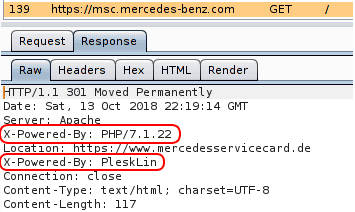
X-Powered-By:
It contains the details of the web framework or programming language used in the web application. For instance, the web application at https://msc.mercedes-benz.com was built with PHP 7.1.22 and is hosted with Plesk.
X-AspNet-Version:
As the name suggests, it shows the version details of the ASP .NET framework. This information may help an adversary to fine-tune its attack based on the framework and its version.
Uncommon Headers That Bypass Everything
X-Original-URL
Use case: Bypassing access controls or routing rules.
Originally used by Microsoft’s IIS, this header can be interpreted by internal proxies or apps to override the request path.
GET /admin HTTP/1.1
Host: target.com
X-Original-URL: /public
This may serve public content despite /admin in the path.
X-Rewrite-URL
Use case: Similar to X-Original-URL, primarily useful against IIS-based systems or load balancers.
GET /admin HTTP/1.1
X-Rewrite-URL: /index.php
X-Forwarded-Host
Use case: Bypassing domain-based access restrictions.
Some apps check the Host header, but WAFs or reverse proxies might inspect X-Forwarded-Host instead.
GET / HTTP/1.1
Host: target.com
X-Forwarded-Host: internal.target.com
Can also trigger SSRF if host-based restrictions are in place.
X-Forwarded-Scheme
Use case: Confusing routing logic that depends on HTTP vs HTTPS.
X-Forwarded-Scheme: http
If an application enforces HTTPS by logic, this can override that.
X-HTTP-Method-Override
Use case: Changing the HTTP verb server-side.
POST /api/delete HTTP/1.1
X-HTTP-Method-Override: GET
Can bypass restrictions that only allow GET methods.
X-Client-IP / X-Real-IP
Use case: Bypassing IP filtering / rate-limiting.
X-Client-IP: 127.0.0.1
This may trick the application into thinking the request comes from localhost.
Forwarded:
Use case: Same as above but more standardized.
Forwarded: for=127.0.0.1;proto=http;by=203.0.113.43
Apps using strict header parsing might honor this more than others.
X-Host / Host Overriding
Use case: Host header attacks and SSRF.
X-Host: admin.target.com
May redirect internal traffic if not properly filtered.
X-Custom-IP-Authorization
Use case: Seen in legacy apps that check this for admin access.
X-Custom-IP-Authorization: 127.0.0.1
X-Original-Method
Use case: Rare but used in method override situations.
X-Original-Method: DELETE
Useful where reverse proxies filter methods but origin app reads from this.
General Headers (Request Metadata)
These headers define how the request is structured.
Host – Specifies the target website (e.g., example.com). Some host header injection attacks rely on manipulating this.
User-Agent – Identifies the browser or tool making the request. Attackers often spoof this to evade detection.
Accept – Defines the expected response format (e.g., application/json).
Content-Length – Indicates the size of the request body. Manipulating this can lead to buffer overflow attacks.
Content-Type – Defines the data type sent (e.g., JSON, form data). Incorrect validation can lead to attacks like CSRF or file upload exploits.
Caching & Performance Headers (Prevent Data Leakage)
Caching headers control how data is stored.
Cache-Control – Specifies caching rules (e.g., no-cache, private).
Pragma – Similar to Cache-Control, used for legacy browsers.
ETag – Used for caching but can leak sensitive data through ETag-based tracking.